The Laser Pointer
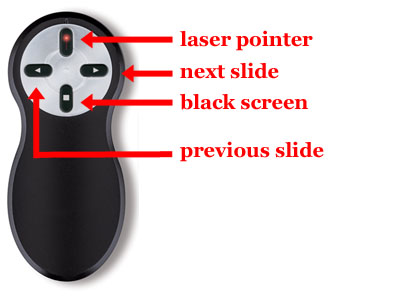
You may use the same laser pointer that Dr. Shaw uses during lectures, journal clubs or seminars. The device is illustrated below and has rather simple modes of action. The first step in use is to eject the USB key from the bottom of the device (push in). Plug this USB device into any USB port and wait about ten seconds (it is just a four key keyboard and will install as a 'USB human interface device' without the need to install any software). The four buttons are illustrated below. The first is the red button which controls the laser pointer. There is one rule to using the laser pointer: point it at the screen before activation. Do not activate the laser in the direction of any person, ever. There is one other detail, and that is that the laser pointer button also sends the 'F5' key to your computer. That keystroke starts a PowerPoint presentation. If you are illustrating something in your web browser, be warned that 'F5' is the keystroke to refresh the page—just pull out the USB device if you'd like to illustrate a webpage without the repeated flash. The right arrow button advances the slide (or event if your slide has events). The right arrow button sends the 'Page Down' keystroke to your computer. The left arrow button take you back one slide (or event) in your presentation. It sends the 'Page Up' keystroke to your computer. The solid square button inserts a temporary black slide in your presentation. Either arrow button will dismiss the black slide returning your presenation at the slide that was visible when the button was pushed. The solid square button sends 'b' to your computer. Knowing the keystroke equivalents will allow you to practice your presentation with the presenter without having the presenter in your hand (minus, of course, the laser).
Last updated at 15:55:21 on 2026-02-21.
18 page views since 07 January, 2026.
Page generated in 0.007 seconds.